Automation Builder and Point of Sale are here
See each step
Build the perfect automation
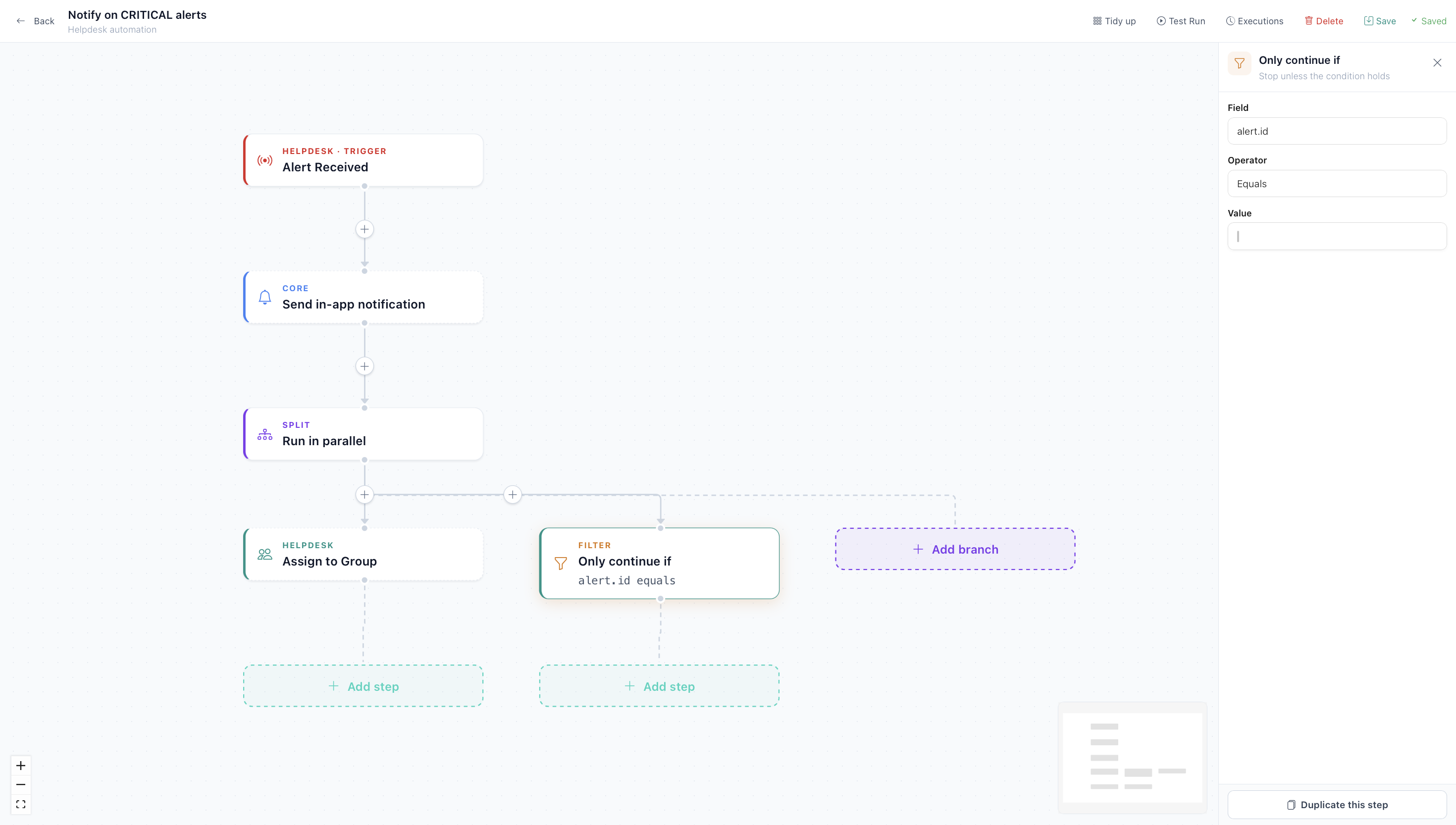
Automation Builder
Building an automation used to mean thinking like the software. Now you click Add step wherever you want one, or hit the plus on a connector to drop a step between two that already exist. Pick a function from a searchable panel and that panel becomes the step's editor. Nothing to drag, nothing to line up. The flow lays itself out top to bottom every time.
The logic you actually need is all there. If / Else for branching. Only continue if, which stops a flow dead unless a condition holds and saves a lot of defensive branching. Split, to run several branches at once. And Wait, which is where most of the fiddly work used to live.
Wait now understands how businesses really run. Pause for a fixed period, until a set time of day, until the next working day, or for a number of business hours, so a two-hour wait at 4pm picks up the next morning rather than at 6pm. You can also wait until a date held on the record, which means renewal and follow-up chasers write themselves.
A few smaller things that take the edge off:
- A cascading category picker, so choosing a category, sub-category and item is three clicks rather than a guess.
- A schedule builder in place of raw cron. No more looking up what the fifth asterisk means.
- Duplicate step, for when you have built something complex and need it again with one field changed.
Automations can administer Microsoft 365 groups too. Add or remove a user from an Entra group, manage licences, and handle the rest of the joiner and leaver routine without anyone opening the admin centre.
For anyone weighing up UK business software, the Automation Builder is the part that tends to decide it. Most platforms either hide automation behind a developer or price it as a separate product.
Point of Sale
Work from a till, tablet or desktop.
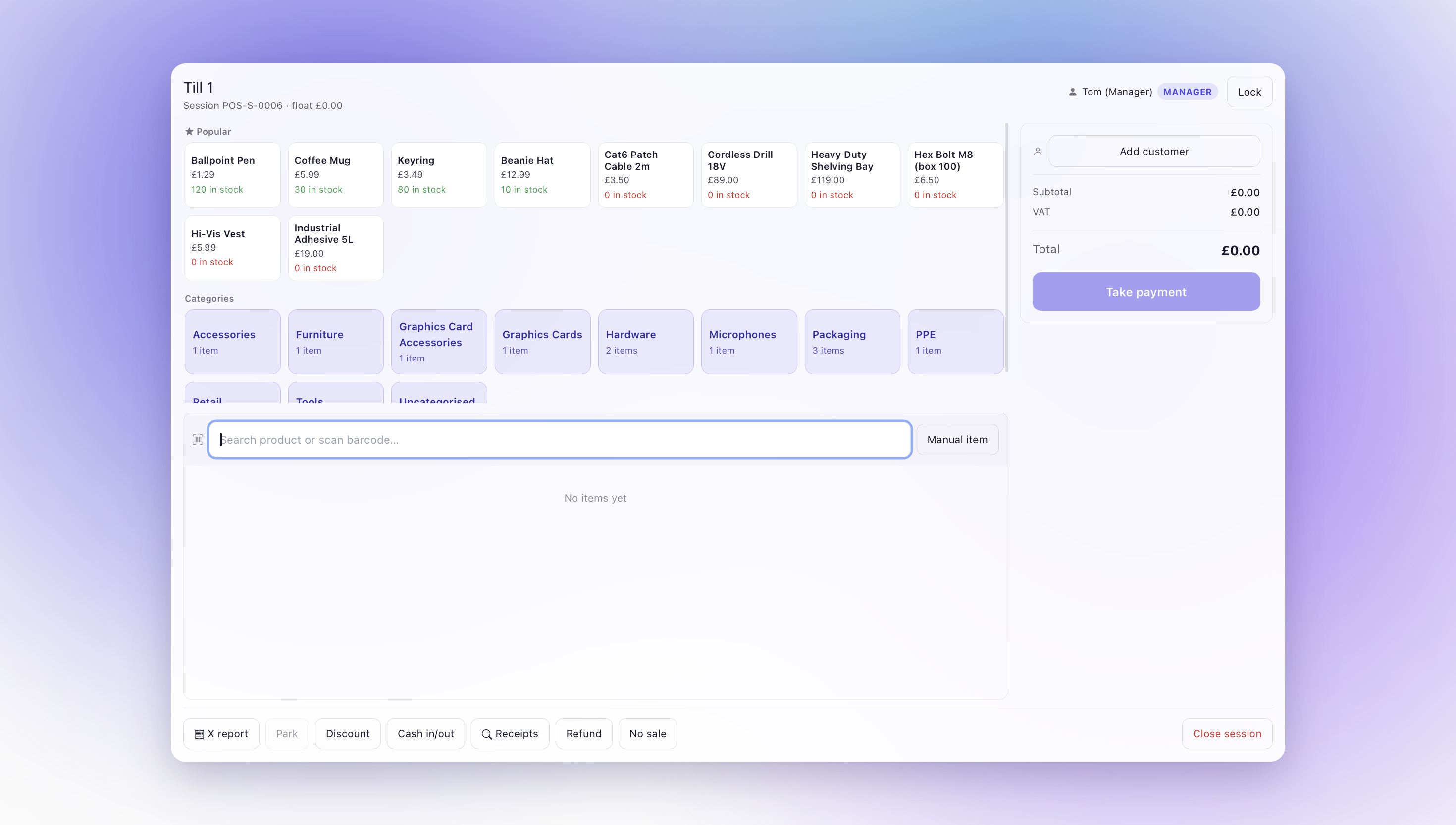
Point of Sale
Chorum now takes payments over a counter, and it is a full till rather than a cut-down one.
Staff work from a catalogue tile grid with popular items and product images up front. Scan a barcode or search the catalogue, adjust quantity, override a price if a manager approves it. The cart handles split and mixed tender, so card and cash on one sale is fine. Park a basket and recall it on any till in the store when someone comes back for the thing they forgot.
Card payments run through a Stripe Terminal reader. Tap or insert, the till drives the reader through to capture, and the sale closes. Card refunds reverse the original charge rather than leaving a credit note behind, and they work on split tender too. If you already take card payments in Chorum for invoices, the till uses that same Stripe connection. One key, one setup.
Card data never touches Chorum's servers. The reader encrypts straight to Stripe and we store a payment reference, nothing more.
Serial and batch numbers get captured at the till. Sell a serial-tracked item and the till prompts you to pick which one, by scan or filter. That serial is marked as despatched, the batch draws down, and it appears on the receipt and in the customer's history. For anyone selling equipment under warranty, that closes a gap that usually means a spreadsheet.
The rest of the shop floor is covered. Receipts print or go by email, and you can now search them by partial reference or by customer rather than knowing the exact number. Refunds put stock back. Discounts work on a whole order or a single line. No-sales and voids are audited with a reason and a manager's PIN.
X and Z reports have grown up. Items sold, average sale, cash in and out, voids, refunds, net takings, sales by employee with commission against target, and an itemised transaction list showing customer and staff. There is a print button. The end of a shift is a report rather than an exercise.
Staff sign in with a PIN and see what their role allows. Cashiers do not need a Chorum account of their own. Price overrides and voids need a manager, and every one of them is recorded. Refunds need a manager too, though that one is a setting. If your shop trusts its staff with refunds, turn it off.
Because the till sits on the same platform as everything else, a sale updates stock, the customer record and the accounts as it happens. Not overnight, not through a connector. The same code that raises a back-office invoice raises the one at the till.
Point of Sale is off until you switch it on. You will find it under Settings, ERP, Point of Sale. Nothing appears in your navigation until you turn it on, so if you have no counter to serve, nothing changes for you.
What is next for POS: offline mode. Right now the till needs its connection. Local queueing with sync when you come back online is the next piece of work, and it is the one we are asked about most.
Also in this release
- A refreshed card treatment across CRM, ERP and dashboards, with KPI tiles now consistent everywhere.
- ERP purchase order lines cleaned up.
- Helpdesk category and alert reference fixes.
- Marketing CMS routing corrections.
- Security and SOC work shipped as well: a security panel on alert-raised tickets, SentinelOne and Defender ingestion, response actions and an AI SOC assessment. That deserves its own write-up, so we are covering it properly on 8 October.